
Creating a New Package
Step 1
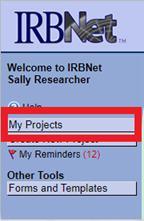
To create a new package for an existing project, log in to IRBNet and select My Projects from the left navigational panel. Locate the appropriate project and click the title to open.
Step 2
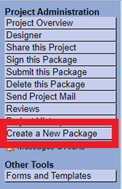
Select Create a New Package from the navigational panel.
Note: If you have an outstanding package (work in progress/not submitted), this button will not appear.
Step 3
This brings you to the Designer page where you can begin attaching required materials within your new package.
Note: When all materials are uploaded to the new package, you must select Submit this Package within the navigational panel for committee review.

Pro Tip: Project vs Package
Think of your project as a book. Your book, or project, is made up of chapters, or packages.
Each time your project requires additional information or revisions, a new package will need to be created.
Pro Tip 2
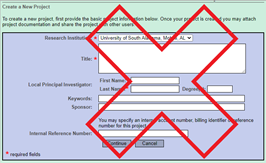
If you are prompted to enter the title of your project while creating a new package, stop and select Cancel. This signals that you are creating a new project and not a new package.
Need additional help?
Please contact your committee administrator:
IACUC & IBC @ daniellemiller@southalabama.edu
IRB @ irb@southalabama.edu